Horny Goat Weed

Horny Goat WeedTea that “helps promote vitality, stamina & healthy natural energy levels” so they claim… but with a name like that would you drink it?

This was taken in a new supermarket over in San Francisco, and was only one of many strange things I discovered on their shelves (more photos will be posted to Flickr as soon as I get them off the iPhone – this one was in the N95 making it a breeze to upload).

iPhone Update

Devicescape for your Apple iPhone
First thing, Devicescape announced today that the iPhone version of its hotspot login software will be available very soon. Check out the Devicescape blog post for information about getting on the list for downloads if you’re interested in trying that out.

iPhoneOpener
Since there are now much simpler ways to get the iPhone ready for third party software, I suggest that people don’t use my iPhoneOpener software anymore for this purpose. Instead, I recommend iNdependence for Mac users looking to get ssh/sftp setup, and the Nullriver Installer.app for those on Windows or Mac OS looking to just add cool third party apps to their iPhones.

What’s Wrong With This?

What's Wrong With This?The screenshot was taken at around 7am this morning! Looks as though somebody messed up the GSM network time on the AT&T network last night. Not sure when it was broken (though my 5:25pm alarm I have to make sure I catch the bus went off again in the middle of the night, waking me up).

Just after taking the screenshot I called AT&T to report the issue (a simple mistake of setting the time to local time rather than GMT), and then at 7:08am my phone magically caught up with reality.

FON Blocking Some YouTube Content

Much the same way as FON were accidentally blocking access to half of the Flickr image pool because of badly setup DNS, it seems that they are now blocking access to some Google hosted content. That affects some YouTube videos, some of which seem to be hosted on Google servers already, as well as some other Google acquisitions like Orkut.

The screen grab shows what you see when you try to go to one of these videos while connected through the FON AP (and I’m connected to the private network SSID on it here, not the public hotspot SSID). Connecting directly to my local ISP, the video plays without any problem.

Continue reading

Windows Genuine Disadvantage

Boing Boing is reporting that the servers at MS that provide the backend for the Windows Genuine Advantage malware that they insist on forcing people to install as a critical update to Windows systems, are down. The result is that any XP or Vista machines asking MS if they are genuine will assume that they’re not.

On Vista, perhaps the most appropriately named version of Windows ever (looks pretty, adds nothing new), there are reports that this will cause it to revert to a more basic mode, disabling many of the important features (like the transparency & visual effects on the desktop – see what I mean about the name).

Initial reports said that the servers might be down until Tuesday, though there is now a posting on an MS forum stating that they are working on getting them back ASAP, and that machines should not be going into a reduced functionality state.

What are the lessons to be learned here? For consumers:

  • Don’t buy from a company that treats you as a thief from the outset. There are plenty of viable alternatives out there now that will not be subject to this kind of failure. Use FreeBSD, Linux or even Mac OS. This is another area where Apple leads the way in the commercial space I think: rather than trying to force malware on its users (by calling it an Advantage), they chose to create a family pack license that allows people to upgrade multiple machines in one household for a much reduced price. A smart approach.
  • Don’t believe it when a company tells you that they’re adding DRM to protect you. This WGA malware is not there to protect you; it is there to monitor you and report back to MS.

For Microsoft there might be some lessons here too:

  • Don’t run critical systems on Windows. It is not a good enough OS to run critical servers. It is almost good enough to run word processing software, though even that is doubtful.
  • Don’t use DRM to protect software like this. The only people not impacted by this server failing are those running the illegal copies where the feature has been disabled already. Once again, DRM hurts the honest paying customers, and has no impact on the problem.

Apple iPhone UIKit Buttons

UIKit ButtonsHaving just spent a day or so working out how to get the iPhone’s UIKit push buttons to work, and connected to the Devicescape application, I thought I’d share what I had discovered.

I ended up using UIPushButton class for my buttons, though since this is the base class for a lot of the other button types almost everything here applies to those too.

Continue reading

Schmap Maui and Molokai Third Edition

StarsThe folks at Schmap have chosen three of my photos for inclusion in the third edition of their Maui and Molokai guide. Unlike last year though, this year’s guide is available online.

The three pictures from my Flickr stream are the one to the right for the aquarium, and a couple from the sugar museum.

Check ’em out (and you can still download the guides if you want to take them with you).

Devicescape on Apple iPhone

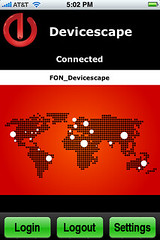
Devicescape User InterfaceAfter a few days of work, I now have a pre-alpha version of Devicescape‘s hotspot login agent running on our iPhone. It is not ready for release, but it is doing basic logins, and has a simple UI (though mostly a status screen at the moment).

The screenshot shows a connection to a FON AP, but I have also logged in to our in-house test hotspot, the T-Mobile one in Starbucks across the road and a German T-Mobile hotspot we have in our shielded room for testing against.

Still more to do on this (at the very least a button for logging out of the network would be useful), but it is a start.

None of this would have been possible without the progress made by the folks at the Phone Dev Wiki of course, especially on the toolchain.

Thanks also to Eric Sadun for the screenshot utility.

iPhoneOpener 0.2

Since iOpener was not the best name (it was already used), I have renamed the tool for jailbreaking and installing ssh as iPhoneOpener. The code remains basically the same as before, though I have added some new features to it:

  • iPhoneOpener now generates the keys (by invoking dropbearkey)
  • Automatic download and unpack for firmware image, if necessary (see README for how to avoid the download if you have the restore image already)
  • Installs scp, sftp-server, the necessary shells for this to work (bash and csh), and fixes the master.passwd file to use csh (since it is smaller than bash) so scp works.
  • Installs some more useful binaries: ls, cat, mkdir, rm, rmdir, curl, vim

I have also made up a PPC and Intel bundle for each one with the required dropbearkey and iPhoneOpener binaries in them too for those who don’t want to compile it all. [If somebody could fix the Makefile so that I can make a universal version of these, please do so and either paste the patch into a comment, or email me on john AT bluedonkey DOT org]

If you want to use iPHUC with your iPhone after this version of jailbreak, then you’ll need to patch that so that it knows to use the com.apple.afc2 service (otherwise you’ll be stuck in jail). You can download the patch from here.

Any problems, leave me a comment. As with all this stuff, if you’re not confident about your ability to recover the phone should something go wrong, don’t run it. It should work out fine, but I can accept no responsibility if it doesn’t.

Spammers

Just a short note to anybody who finds my site because they’re tracing spam received from addresses in the bluedonkey.org domain. Once again, the spammers have selected my domain to use in their forged sender addresses. I see some of these emails because they bounce, or are blocked by spam filters which are still stupid enough to send responses back to the sender address, as if that is ever valid on spam these days!

The folks at Barracuda Networks are top of my list for stupidity in this regard. You’ve made it into my filter list now so any email coming from your tool will be trashed instantly. For a company that is supposed to specialise in spam, you seem to be remarkably clueless on how to deal with it:

Just drop it – do not send it ‘back’ since it almost certainly didn’t come from the address in the ‘From’ line anyway, so all you’re doing is spamming somebody else who had nothing to do with it.