Schmap iPhone Guides

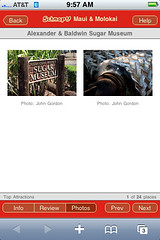
Alexander & BaldwinTried to blog about this a couple of days ago, but that was when Flickr was having problems, and blog posting seemed to be one of the things that wasn’t working!

Schmap have now launched a version of their online city/region guides formatted for the iPhone. This is a very handy tool since you can access it over the iPhone’s cellular connection while you’re actually traveling (I don’t normally carry my laptop around when on vacation, but I do take my mobile phone with me).

No special URL needed (though I’d like it if one was available); the site will automatically give you the iPhone version when you visit from Mobile Safari.

Location Tagger, AT&T Wi-Fi and Twitter

Starbucks, AlamedaI installed a new app on my N95 the other day from the Nokia Beta Labs: Location Tagger. This is one of the things that should have been built into the camera application from day one on a GPS enabled phone, but I’m glad to see they’re catching up.

The photo on the right is my first test of this new feature. The photo was automatically geo-tagged (so, if you visit the photo’s page in Flickr, you can see it placed on a map). Flickr seems to be confused about the city (it thinks Alameda is Oakland!), but it shows up in the correct place on the map.

Why was I at Starbucks? Well, I stopped by to see whether AT&T had disabled the free Wi-Fi for iPhone users. The special free login page has indeed gone, replaced by the older iPhone login page, though it did still let me on using the iPhone credentials I had stored in my Devicescape account 🙂

Finally, I finally signed up for Twitter, and added the Twitter feed to the left column on the blog. Since it is connected to my IM client (Adium, for those wondering), I can send it short messages about what I’m up to, and they’ll end up here on the blog as well as on my Twitter page.

AT&T Wi-Fi Free for iPhone Users

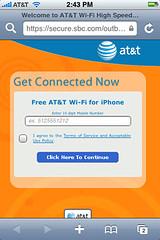
AT&T Wi-Fi iPhone Login PageWell, to be more accurate, free for AT&T iPhone users. If you have your service through AT&T still, then you should get this login page when you connect to the attwifi SSID at Starbucks, or anywhere else. Enter your 10 digit AT&T mobile number and you’re online.

Devicescape users can add the special ‘AT&T Wi-Fi (iPhone)’ credential type to their account, and they will get online automatically.

There have been rumours around that the same will be enabled for anybody with an AT&T mobile data plan at some point; I expect the iPhone is being used as the test platform here since they already had mobile pages for the iPhone (my N95 still sees the full page).

Update, May 4, ’08: Seems that the web page has been taken down now (guess too many folks were abusing it by changing their browser agent string and getting online with non-iPhone devices).

Nokia N95 Cartoonise

Saturn Sky (Cartoon)I love the iPhone for web browsing and email, but the Nokia N95 wins hands down when it comes to photos, and that’s important for me because I just can’t carry my Canon 20D everywhere I go. I can, and do, carry my mobile phone!

Tonight, as I was walking up to the ferry terminal in SF, this bright red Saturn Sky pulled up on the footpath area and paused. Long enough for me to get the N95 out and snap a couple of shots, but probably not long enough to have unpacked the SLR.

But then, while sitting waiting for the ferry to arrive, I discovered that not only can it take stunning photos (there is no comparison to the iPhone’s camera in terms of quality), but there’s also an image editor on the phone that can crop, resize, sharpen, adjust colors and even apply a cool cartoon effect. Oh, and then I can upload the full size image straight into my Flickr stream, all from the phone.

Saturn Sky (Cartoon 2)Update: Check out the punched up version (created using the Gimp to adjust the levels a little on the original image).

Now I just need to work out how to get something similar to that from the image editor in the phone, which is a lot less sophisticated than the Gimp or Photoshop 🙁

No Service

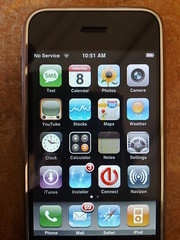
No ServiceArrived at Sugar Bowl this morning to discover that my iPhone has no service here. Oddly though, my N95, which is also on AT&T, does have coverage, and in fact pretty much full signal strength.

Luckily, here in Judah Lodge there is free Wi-Fi (SSID: EXWIRE or exwire depending on where you are). That too is a little strange as the same network is available in the main lodge, but there it is a paid hotspot network instead (which I have now added to Devicescape’s collection as well).

Also, if you’re going to provide Wi-Fi, especially paid Wi-Fi with a 2 hour minimum and day pass option, you really need to make sure that there are plenty of power outlets available as well.

iPhone Update

Devicescape for your Apple iPhone
First thing, Devicescape announced today that the iPhone version of its hotspot login software will be available very soon. Check out the Devicescape blog post for information about getting on the list for downloads if you’re interested in trying that out.

iPhoneOpener
Since there are now much simpler ways to get the iPhone ready for third party software, I suggest that people don’t use my iPhoneOpener software anymore for this purpose. Instead, I recommend iNdependence for Mac users looking to get ssh/sftp setup, and the Nullriver Installer.app for those on Windows or Mac OS looking to just add cool third party apps to their iPhones.

Devicescape on Apple iPhone

Devicescape User InterfaceAfter a few days of work, I now have a pre-alpha version of Devicescape‘s hotspot login agent running on our iPhone. It is not ready for release, but it is doing basic logins, and has a simple UI (though mostly a status screen at the moment).

The screenshot shows a connection to a FON AP, but I have also logged in to our in-house test hotspot, the T-Mobile one in Starbucks across the road and a German T-Mobile hotspot we have in our shielded room for testing against.

Still more to do on this (at the very least a button for logging out of the network would be useful), but it is a start.

None of this would have been possible without the progress made by the folks at the Phone Dev Wiki of course, especially on the toolchain.

Thanks also to Eric Sadun for the screenshot utility.

iPhoneOpener 0.2

Since iOpener was not the best name (it was already used), I have renamed the tool for jailbreaking and installing ssh as iPhoneOpener. The code remains basically the same as before, though I have added some new features to it:

  • iPhoneOpener now generates the keys (by invoking dropbearkey)
  • Automatic download and unpack for firmware image, if necessary (see README for how to avoid the download if you have the restore image already)
  • Installs scp, sftp-server, the necessary shells for this to work (bash and csh), and fixes the master.passwd file to use csh (since it is smaller than bash) so scp works.
  • Installs some more useful binaries: ls, cat, mkdir, rm, rmdir, curl, vim

I have also made up a PPC and Intel bundle for each one with the required dropbearkey and iPhoneOpener binaries in them too for those who don’t want to compile it all. [If somebody could fix the Makefile so that I can make a universal version of these, please do so and either paste the patch into a comment, or email me on john AT bluedonkey DOT org]

If you want to use iPHUC with your iPhone after this version of jailbreak, then you’ll need to patch that so that it knows to use the com.apple.afc2 service (otherwise you’ll be stuck in jail). You can download the patch from here.

Any problems, leave me a comment. As with all this stuff, if you’re not confident about your ability to recover the phone should something go wrong, don’t run it. It should work out fine, but I can accept no responsibility if it doesn’t.