Multitasking & Battery Life

One thing that has annoyed me for the longest time now is this myth that multitasking somehow reduces battery life. The iPhone multitasks today, it just doesn’t allow multiple third party apps to run concurrently.

I’ve written a lot of software, both application and system level (right down to the lowest levels of an RTOS), and believe me, if it is written properly a background app does little or no harm to battery life.

Many of the applications that people would like to see running in the background would spend almost all of that time waiting for a system event. That waiting state doesn’t harm your battery life; only when the application is actually processing something does it really consume power. The push mechanism on the iPhone today might actually be worse since it has to load the app each time, a far more expensive operation (in CPU, and therefore battery) than just switching to one that is already “running.”

Consider the IM app example that is so often used to support the claim that background apps kill battery life. Sure, if you run the IM app (background or foreground) and stream messages at it continually, then it will reduce the battery life. If you just have it sitting there in case somebody tries to start a session though it isn’t doing anything most of the time (occasional presence messages perhaps). I ran an IM app all the time on my Nokia N95, connected over AT&T’s network 24/7. My battery life was unaffected, as expected.

Another example of a well behaved background app is the daemon that we wrote for the jailbroken version of Devicescape’s app (before the SDK and app store existed). It made no difference to battery life because it spent almost all the time blocked waiting for a system event. One that only happened when a new Wi-Fi connection was made. We run in the background on Nokia, Windows Mobile and Android (not to mention Windows XP/Vista/7 and Mac OS X) today without impacting battery life.

So what will affect battery life? Well, an app that continues to do something in the background, rather than waiting for an event, one that polls for an event rather than blocking until the OS tells it about the event, or one that requires a power-hungry piece of the hardware to be on all the time (e.g. GPS). But even those apps have their place. Imagine a background image uploader: it will do something in the background while it is needed, and then exit or wait for a new photo to be taken. Or an app that checks your location every 5 minutes. It is my choice to use the battery that way, so why restrict it? Just make sure it is reasonable for the application, explained to the user, and under my control (can be checked as part of the review process).

These types of apps don’t take any more power than they would if I left them running in the foreground, but letting me push them to the background allows me to choose if I want to watch them work, or read my email etc.

Above all, please stop spreading this myth that multitasking or background processes will harm battery life. Only badly written apps would do that.

App Store Economics

There’s a lot been written about how amazing the iPhone app store is, how many apps it offers and how many downloads (a somewhat deceptive number since it includes updates) there have been. But recently there has been an increasing amount of noise in the developer community about the problems with the app store, and in particular its long term (or even medium term) viability. Why is that? Aren’t developers reaping the rewards of all those downloads and becoming rich?

Continue reading

iNewz Comes to Twitter

All the iNewz apps (, , and even the new ) have Twitter integration included that allows you to share an article you’re reading with your Twitter followers.

But now they have something new too: As long as @iNewz is following you on Twitter, it will pick up your posts and re-tweet them. And, of course, if you follow @iNewz you’ll be able to see all the articles that other iNewz users found interesting enough to share!

If you already share articles on Twitter from any of the iNewz apps, and we’re not already following you, send us a reply on Twitter or leave us a comment here on the blog (including your Twitter name) and we’ll add you to the list.

iPhone 3GS, AT&T and Upgrading

iPhone 3GSSo, the internet (or perhaps, more specifically, the iPhone early adopters) are, to put it mildly, frustrated at AT&T following yesterday’s announcement of the new iPhone 3GS. Why? Well, three things come up: failure to have MMS in time for the launch, failure to have tethering in time for the launch, and the additional $200 on the price of the handsets for those who have less than 18 months on their current contract (that’s all iPhone 3G users!).

In addition to its dramatic influence on the design of handsets (including built in software), and the sale of additional applications and content, the iPhone has also in the last 24 hours demonstrated a new type of customer to the carriers of the world. These are the early adopter Apple fans who must have the latest phone. They’re vocal, as a quick trip to Twitter, or even the top iPhone and Apple websites & blogs will demonstrate, and they’re annoyed. What could have been a great day for AT&T (and, from what I’m reading, O2 in the UK is just as bad) has turned into a PR nightmare for them. AT&T in particular is being lambasted from all sides. People are annoyed about coverage, about the fact that they failed to deliver the two new network features (that most other iPhone network operators will have on time), and then they slap their “valued” customers in the face when they try to upgrade.

I’m not saying they’re wrong to require the 18 months before they offer the discount (if that’s the time the subsidy was amortised over, then that’s only fair). But, they could have handled it in a much better way. Especially when it is actually cheaper to cancel your contract, pay the pro-rated early termination fee (ETF), and then sign a new contract. Here’s a simple way they could have made this more palatable to the iPhone early adopter crowd:

Choose:

  • Pay the remainder of the ETF and sign a new 2 year contract;
  • Extend your existing contract by 24 months.

That’s not really a lot different to what they have done, but I think it would have come over as more palatable than just being hit with a $200 premium for the new phone.

Automating AppViz Downloads

AppVizI’m going to be out of the office for a week. Including the two weekends, that means 9 days, and the App Store daily reports are only maintained for 7 days so that would mean losing 2 days of data in AppViz, the amazing tool from IdeaSwarm that I use to keep track of sales and reviews etc. What to do?

Well, three options came to mind:

  1. Accept the loss of data (AppViz will fill in the missing information to some extent from the weekly reports, so it is only really a loss of resolution);
  2. Take a laptop, find an internet connection on my trip and download the data files to there (AppViz can read the downloaded files);
  3. Find a way to schedule the AppViz to download the data on its own while I’m away.

The first two options didn’t appeal much, so I asked on Twitter if anybody had any ideas for scheduling AppViz. And two people responded with the information I needed (thanks @jonathanbenari and @graiz). So, without further ado, here’s what I did:

Continue reading

iNewz 2.7 (Coming soon)

iNewz 2.7Update: iNewz 2.7 is now available on the iTunes App Store (as are iNewz Tech 2.7 and iNewz Green 2.7).

Busy weekend this weekend. I finally got the update for iNewz (and iNewz Tech) that I’ve been working on for a while now submitted to Apple for review.

What’s new?
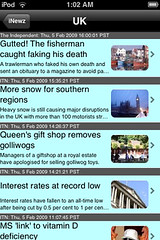
Well, the most visible differences are the switch to the black top bar (somehow it looks a little more sophisticated to me), and moving the thumbnail images from the left to the right in the headlines view. “Huh?” you ask. Well, the other big difference is that when there is no image for an article, it no longer displays the placeholder iNewz icon. And with the images on the left that made for a ragged left edge which was hard on the eyes.

So, images are on the right, when available, and they’re scaled to keep their aspect ratio and feature rounded corners now (yes, I’ve been having some fun with the CG section of the SDK!).

Another big change: Maintenant, iNewz inclus les actualités français. Nouvelles de langue française vient de France et au Canada.

iNewz Tech
The technology variant of iNewz picks up the same UI changes of course, and a few extra sources, including KRAPPS and MacWorld.

One Last Thing
A new iNewz variant was also added to the family with this update: iNewz Green. For all your environmentally sound, eco-friendly green news in the palm of your hand.

iNewz 2.5 (coming soon)

iNewz 2.5 (coming soon) - offlineUpdate (December 14, 2008): Version 2.5 is now available in the iTunes store.

The new version of iNewz is now with Apple for review… New features include an offline reading mode which was requested by a few people, complete with a simple bookmark option to tag an article if the summary information from the feed makes it sound as though you’d like to read more.

The offline mode will be used automatically if the application detects that there’s no network available, but it can also be switched on manually so that all articles will display in offline mode. You can then use the Open Page button to get to the full article on the web.

To make offline mode work, there’s also a bulk sync option that will update all the sources you’re subscribed to – can take a while if you have a lot of sources!

No reviews?

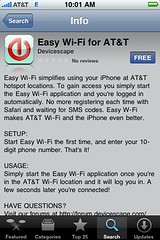
No reviews...Devicescape’s new application, a version of Easy Wi-Fi especially for AT&T, has been in the app store now for a few days. The screen shot here from my iPhone shows that it has no reviews (and if you scroll down to the bottom, the place where the link to any reviews is found also says that there are no reviews.

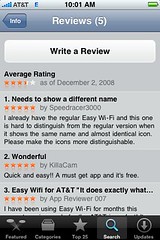
So what? It’s only been a few days after all. But wait, if you click on that button to open the reviews page, you get this:

But really five reviews!

So there are actually five reviews. Why doesn’t the app store app indicate that?

And want another mystery? See that average ranking there – 3.5 stars, well I don’t know how they calculate it because all five of those reviews have 5 star ratings. Last time I checked, 5 * 5 / 5 is 5, not 3.5.

Seems the app store has a number of basic arithmetic problems! And this is not going to help developers much. The ratings and review system is bad enough as it is, but this makes it worse still. An average of 3.5 when all the ratings shown in the reviews are 5 star is pretty damaging. Have you checked whether your aggregate rating is correct?

Apps or Applets?

sbux balanceI’ve seen a lot of discussion recently about application development for the iPhone and iPod touch platforms, and in particular whether the current trend for very low cost apps is sustainable long term.

The first article I read was Andy Finnell’s How to Price Your iPhone App out of Existence. My own experiences with the app store were pretty consistent with his observations, but it got me thinking a bit more about this issue.

VentureBeat also noted that the $0.99 price is going to make it next to impossible to live off of an application, and they’re suggesting that the price is tending back up towards $9.99. Driven in that direction not by consumers (obviously), but by the developers coming to the realisation that they can’t afford to write high quality applications at the lower price points.

Continue reading

Top Three iPhone/iPod Touch Apps

There are lots of apps out there now for iPhone and iPod users to choose from, and plenty of reviews within the App Store as well as on the web, so I’m not about to review any apps here. Instead, I thought I tell you about my three most used applications, and why I use them so much. So, without further ado, let’s jump in to the list:

iNewz, news readeriNewz
iNewz is a news reader application that aggregates content from a number of news sources, mostly US ones in the current version. I use it because I spend an hour a day sitting on a bus commuting (half an hour each way), and I guess I’m a secret news junkie. The news is organised into categories, with articles for each category from several sources listed in reverse chronological order. My top categories? Headlines first, always, then World News and Technology news. That normally fills a commute!

Easy Wi-Fi
I have to include Easy Wi-Fi since I spent so much time working on both the initial jailbreak version, and then this App Store version. But aside from that, I do truly find it incredibly useful and I use it almost every morning at Starbucks – handy having that free Wi-Fi account from AT&T simply for using a registered pre-paid Starbucks card. The iPhone normally latches on to the Wi-Fi as I walk in, and one tap gets me online. Not quite as convenient as the background mode the jailbroken version had, but still a lot faster than typing my user name and password into the AT&T web form every morning (and I only have a few minutes in Starbucks most mornings to buy coffee, sync email and load up the Daily Irrelevant).

Truphone
Last, but not least, Truphone – the voice over IP application that has been around for other mobile phones for a while (and one I use on my Nokia N95 via its built in SIP stack). Needs Wi-Fi to work, but that’s fine by me as I’m usually somewhere where there is Wi-Fi when I need to make international calls. Combined with Easy Wi-Fi to get me online in public hotspots, this means I can keep in touch with folks around the world for very little money. I called my mother over in England while sitting outside a Starbucks in San Jose last weekend – free Wi-Fi from AT&T, Easy Wi-Fi to get me online and Truphone to make a very cheap international call.