iPhone Progress

Lots of progress recently on the iPhone front (been busy with that, and a couple of other research projects for work, hence the lack of posts). Tonight I uploaded the source for a little tool called iOpener that combines the jailbreak function with the installation of the dropbear ssh server.

It is based on the well documented iPhoneInterface app developed by the folks at the iPhone Dev Wiki, but removes the shell function and replaces it with pre-programmed commands (the same way the jailbreak app automates the process of getting out of the chroot jail). It also employs the same trick as jailbreak to enable iTunes to function correctly as well (and therefore also supports the latest versions of iPhoneInterface).

For now you can download it from here. I’ll re-host it somewhere on bluedonkey.org soon. Next target for me is to get Devicescape‘a hotspot login application running on the phone… Since we have a Mac OS X version, I’m hoping it will port easily now there is a toolchain in existence.

iPhone Application Development

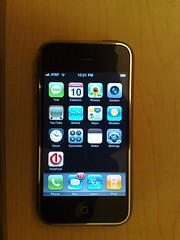
New iPhone ApplicationMaking some progress on getting applications installed on the iPhone. There is still a lot of work to do though, and the team over at the iPhone Dev Wiki (you can find them through their IRC channel: #iphone @ irc.osx86.hu, or using Google, but they ask people not to link directly) are making a lot of valuable discoveries towards this goal.

The photo, which is real, shows a new icon on the SpringBoard screen; the icon is Devicescape‘s and provides a clue as to what I am trying to add to the iPhone. Currently it just launches the FieldTest app though.

Nokia N95 vs Apple iPhone

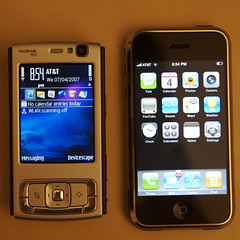
iPhone & Nokia N95I’ve had the iPhone for a few days now (and the N95 for over a month), so I thought I’d post a little comparison. There are plenty of other places out there with reviews and comparisons, and the N95 is the obvious phone to compare it to.

The first surprise with the iPhone though is how heavy it is. The N95 feels like a hollow shell by comparison!

Purely from the specs, the N95 has the iPhone beaten. That topic has been beaten to death everywhere, including a series of amusing YouTube videos in the Apple Mac vs PC style.

The UI though leaves the Nokia in the dust (and I’m not even going to talk about Windows Mobile – that should just be purged from the earth). Most of the apps make good use of the UI too, especially the flick scrolling.

Both devices are amazing, but both have their flaws too. The N95 interface is clunky at times, though even the stunning UI on the iPhone has problems – the keyboard is really hard to use. The camera on the iPhone is terrible, though the N95 one has issues at times too (I’ve had days, like today, when the auto-focus just refuses to lock).

The biggest thing that is missing from the iPhone though is simple: no third party applications. It comes with essentially 13 applications on top of the basic mobile phone behaviour. My N95 comes with over 20 applications, and I can add more very easily. I currently have Opera Mini, Google Maps, ScreenShot and, of course, Devicescape.

Roomba EULA

EULAI’ve had my Roomba for a couple of weeks now, and so far I am impressed. I’m impressed how well it finds its way around. I’m impressed with how well it actually cleans. But perhaps I was most impressed by iRobot as a company.

My first clue was that the schematic diagram of the Roomba in the manual included a description of where the serial port was. I had to double take. In all my dealings with consumer electronics in the Wi-Fi space, we’ve had to jump through hoops to get access to a serial port on a production device. In one case we had to add surface mount zero ohm resistors (anybody remember when these were just links?). And here’s a device that not only has the port accessible, but it is labelled in the user manual.

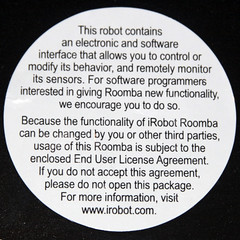
Then I found the sticker on the already opened bag. A EULA for a device? Surely not, but reading more I found: “For software programmers interested in giving Roomba new functionality, we encourage you to do so.” Now that is an enlightened company.

It is this kind of willingness to let others, including your end users, extend and improve your product that defines Web 2.0 and Mobile 2.0. Although most Roomba vacuuums are not connected to the internet, they are application specific devices, and they have an API and documentation for developers. If more consumer electronics devices came with this level of support for user experimentation the world might just be a little bit better off.

On the subject of Web/Mobile 2.0, I will be co-presenting a session about Mobile 2.0 on behalf of Devicescape at the Web 2.0 Expo this week. You can read more about that on the Devicescape Blog 2.0.

Mustek PF-A700B Picture Frame

So, I bought one of these digital frames a while back and just got around to trying it out. The frame has a roughly16:9 aspect ratio screen, so I was expecting to have to crop some of my images to that ratio so that they’d display nicely (it does also support a 4:3 mode, but that leaves black bars left & right on the screen).

Problem was that when I converted the images to the 480 x 234 resolution that the manual states the screen is, I ended up with black bars above and below and the image squashed down. Took me a while to work out what it was really doing… even in 16:9 mode it is expecting to be given 4:3 photos (which is what most digital cameras take). All it does is stretch them out to fit the screen, which distorts them.

My solution, after a little trial and error, was this process:

  1. Scale the image to be 960 pixels wide, preserving the aspect ratio. In my case, I got iPhoto to export them at that width, but you could do it afterwards too.
  2. Crop the image so that it is 960 x 468 pixels. I have this set up as a Photoshop action to take the centre slice, but for some images that is not the best crop and you’ll have to do those manually.
  3. Finally, scale the image to be 624 x 468 not preserving the aspect ratio in this case (so you effectively squash it horizontally). This will make it look very strange on the PC, but the frame will stretch it back out.

So you can see what the effect of the processing is, here’s a before and after pair from one of the photos I took in Mexico:

Before After

When the frame stretches this out again to the 16:9 ratio it will look normal. The reason for the additional resolution, despite the recommendation in the user guide not to exceed 480 x 234, is so that it has more pixels than it needs. When I tried the smaller images, they came out looking blurry. The 624×468 resolution seems to look OK unless you study it close up (and who does that with a framed snapshot?).

I have the steps above stored in an action in Photoshop so I can apply it to a batch of photos, store them on a CF card and then have them run as a slideshow. The quality of the screen is not stunning, but then I didn’t expect it to be for the price. What was disappointing was that I couldn’t just load native resolution images into it and have it just render them directly, but my simple image processing trick works around that problem nicely and I am happy with the results.

Getting Connected On Campus

This is one of three Devicescape commercials that are now available on YouTube (I’ll be posting the other two later this week as well). Have you tried it yet? If not, download it for free and check it out. You can get it for Windows XP, Windows Vista, Mac OS X, Windows Mobile, the Nokia 770 and 800 web tablets and the Linksys WIP300 VoWLAN handset.

T-Mobile SDA, Devicescape, FON and Skype

One of three (silent) iSight movies I made of Devicescape-enabled devices connecting automatically to my FON hotspot here at home. To prove that it is connected, I then use the Skype application that I installed on the phone to make a call to their testing service.

This combination of cell phone, wi-fi, Devicescape and a VoIP service like Skype makes for a very compelling solution. I used tihs as my cell phone on our recent trip to Mexico since it allowed me to be on the cellular network in case somebody needed me, but use the free hotel wi-fi network to call home at Skype-out rates.

If you want to check the other two videos I made, one is the Linksys WIP300 connecting and receiving a call, the other is the Nokia 770 web tablet (I don’t have an 800 unfortunately) connecting and then going to a web page.

Can you do better? Make a video of your device connecting using Devicescape and send me the link to it through the comments here (or the Devicescape forums). I’d love to see more 🙂

Apple’s Vista Ad and More…

One of the most annoying things about the early versions of Vista that I was playing with was the continual darkening of the screen and question about whether to allow something I had just asked for. That is what this commercial from Apple is playing off of. Perhaps the worst example of this was having to allow notepad to open each time I wanted to view the source for a web page from IE7. Apart from the fact that by now they should be able to open it inside the browser and display it with syntax highlighting like every other browser, having to approve it every time is really annoying.

Continue reading