iPhone 3GS, AT&T and Upgrading

iPhone 3GSSo, the internet (or perhaps, more specifically, the iPhone early adopters) are, to put it mildly, frustrated at AT&T following yesterday’s announcement of the new iPhone 3GS. Why? Well, three things come up: failure to have MMS in time for the launch, failure to have tethering in time for the launch, and the additional $200 on the price of the handsets for those who have less than 18 months on their current contract (that’s all iPhone 3G users!).

In addition to its dramatic influence on the design of handsets (including built in software), and the sale of additional applications and content, the iPhone has also in the last 24 hours demonstrated a new type of customer to the carriers of the world. These are the early adopter Apple fans who must have the latest phone. They’re vocal, as a quick trip to Twitter, or even the top iPhone and Apple websites & blogs will demonstrate, and they’re annoyed. What could have been a great day for AT&T (and, from what I’m reading, O2 in the UK is just as bad) has turned into a PR nightmare for them. AT&T in particular is being lambasted from all sides. People are annoyed about coverage, about the fact that they failed to deliver the two new network features (that most other iPhone network operators will have on time), and then they slap their “valued” customers in the face when they try to upgrade.

I’m not saying they’re wrong to require the 18 months before they offer the discount (if that’s the time the subsidy was amortised over, then that’s only fair). But, they could have handled it in a much better way. Especially when it is actually cheaper to cancel your contract, pay the pro-rated early termination fee (ETF), and then sign a new contract. Here’s a simple way they could have made this more palatable to the iPhone early adopter crowd:

Choose:

  • Pay the remainder of the ETF and sign a new 2 year contract;
  • Extend your existing contract by 24 months.

That’s not really a lot different to what they have done, but I think it would have come over as more palatable than just being hit with a $200 premium for the new phone.

Top Three iPhone/iPod Touch Apps

There are lots of apps out there now for iPhone and iPod users to choose from, and plenty of reviews within the App Store as well as on the web, so I’m not about to review any apps here. Instead, I thought I tell you about my three most used applications, and why I use them so much. So, without further ado, let’s jump in to the list:

iNewz, news readeriNewz
iNewz is a news reader application that aggregates content from a number of news sources, mostly US ones in the current version. I use it because I spend an hour a day sitting on a bus commuting (half an hour each way), and I guess I’m a secret news junkie. The news is organised into categories, with articles for each category from several sources listed in reverse chronological order. My top categories? Headlines first, always, then World News and Technology news. That normally fills a commute!

Easy Wi-Fi
I have to include Easy Wi-Fi since I spent so much time working on both the initial jailbreak version, and then this App Store version. But aside from that, I do truly find it incredibly useful and I use it almost every morning at Starbucks – handy having that free Wi-Fi account from AT&T simply for using a registered pre-paid Starbucks card. The iPhone normally latches on to the Wi-Fi as I walk in, and one tap gets me online. Not quite as convenient as the background mode the jailbroken version had, but still a lot faster than typing my user name and password into the AT&T web form every morning (and I only have a few minutes in Starbucks most mornings to buy coffee, sync email and load up the Daily Irrelevant).

Truphone
Last, but not least, Truphone – the voice over IP application that has been around for other mobile phones for a while (and one I use on my Nokia N95 via its built in SIP stack). Needs Wi-Fi to work, but that’s fine by me as I’m usually somewhere where there is Wi-Fi when I need to make international calls. Combined with Easy Wi-Fi to get me online in public hotspots, this means I can keep in touch with folks around the world for very little money. I called my mother over in England while sitting outside a Starbucks in San Jose last weekend – free Wi-Fi from AT&T, Easy Wi-Fi to get me online and Truphone to make a very cheap international call.

Free Portable Music – Legally

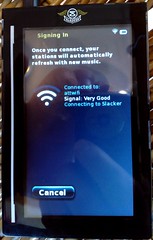
Slacker + DevicescapeI’ve spent the day walking around downtown San Francisco testing the new Slacker Portable Player with Devicescape enabled firmware on it so I can sync my radio stations at public hotspots as well as at home.

Notice the top line of that that screen shot where it says “Signing in” – that’s Devicescape at work, getting me online here at the Coffee Bean and Tea Leaf on Market Street. And once it is done, it logs me out too.

For those that haven’t heard of Slacker before (where have you been?), they have a flash player for your browser that lets you choose one of their radio stations to listen to, or customise one of your own. The portable allows you to sync a few stations onto a device you can put in your pocket and then take with you. Internet radio for when you’re not connected. Next time you’re near Wi-Fi, just connect and it will re-sync getting you new tunes to listen to.

How is this free? Well, they limit the number of times you can skip forward per hour, and might also throw in some commercials (though I’ve yet to hear one). If you want the freedom to skip as often as you like, or the guarantee of no commercials, they have a monthly subscription premium plan too.

Nokia N95 Cartoonise

Saturn Sky (Cartoon)I love the iPhone for web browsing and email, but the Nokia N95 wins hands down when it comes to photos, and that’s important for me because I just can’t carry my Canon 20D everywhere I go. I can, and do, carry my mobile phone!

Tonight, as I was walking up to the ferry terminal in SF, this bright red Saturn Sky pulled up on the footpath area and paused. Long enough for me to get the N95 out and snap a couple of shots, but probably not long enough to have unpacked the SLR.

But then, while sitting waiting for the ferry to arrive, I discovered that not only can it take stunning photos (there is no comparison to the iPhone’s camera in terms of quality), but there’s also an image editor on the phone that can crop, resize, sharpen, adjust colors and even apply a cool cartoon effect. Oh, and then I can upload the full size image straight into my Flickr stream, all from the phone.

Saturn Sky (Cartoon 2)Update: Check out the punched up version (created using the Gimp to adjust the levels a little on the original image).

Now I just need to work out how to get something similar to that from the image editor in the phone, which is a lot less sophisticated than the Gimp or Photoshop 🙁

No Service

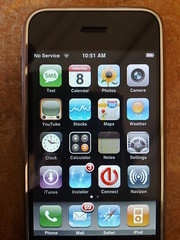
No ServiceArrived at Sugar Bowl this morning to discover that my iPhone has no service here. Oddly though, my N95, which is also on AT&T, does have coverage, and in fact pretty much full signal strength.

Luckily, here in Judah Lodge there is free Wi-Fi (SSID: EXWIRE or exwire depending on where you are). That too is a little strange as the same network is available in the main lodge, but there it is a paid hotspot network instead (which I have now added to Devicescape’s collection as well).

Also, if you’re going to provide Wi-Fi, especially paid Wi-Fi with a 2 hour minimum and day pass option, you really need to make sure that there are plenty of power outlets available as well.

Nokia Maps & the 3D View

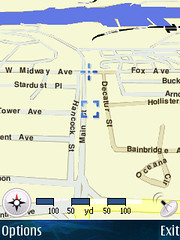
3D ViewEarlier this week I was playing with the maps function built into my Nokia N95, which it seems is a version of Smart2Go. Aside from the slow start on the GPS (even with A-GPS it is not always that quick to get a location), the mapping works well and I’ve used it a lot.

My reason for looking at it in more detail was wanting to know whether the paid option has the one feature that is annoyingly missing from the free version: automatic recalculation of the route if you miss a turn. I didn’t get an answer to that, but for less than $15 I can enable the feature for 30 days and see how well it works on a test drive I guess.

The other thing I discovered is that the maps have a 3D view option (hit ‘0’ to toggle). I’d never noticed that option in the menu before. Switching to it revealed something odd though – the cross hairs that mark the GPS position adjusted to the new perspective. The box that normally keeps track of the GPS location until you move it manually away, did not take the new perspective into account. Take a look at the 2D version here!

The big thing with the 3D view, which is also a problem with the 2D view on the phone, is that it doesn’t rotate based on the direction you’re traveling. That gets very confusing when you’re heading south!

Devicescape Updates

I have a couple of Devicescape updates for everybody tonight (and I’ll also post some more photos soon, but you can check most of those out in my Flickr stream anyway.

Nokia Videos
The video to the right is a video shot by our friends at Nokia that shows Devicescape logging in automatically at a T-Mobile hotspot. Here’s another one shot at San Jose airport.

Both of these videos used the T-Mobile network, but Devicescape also works on most of the other hotspot networks you’ll find around the world.

SF New “Mobile” Tech
The other thing I wanted to mention was that I presented at SF New “Mobile” Tech last night here in San Francisco. If you were there, thanks for coming (especially all the folks who already had Devicescape running on their devices).

iPhone Update

Devicescape for your Apple iPhone
First thing, Devicescape announced today that the iPhone version of its hotspot login software will be available very soon. Check out the Devicescape blog post for information about getting on the list for downloads if you’re interested in trying that out.

iPhoneOpener
Since there are now much simpler ways to get the iPhone ready for third party software, I suggest that people don’t use my iPhoneOpener software anymore for this purpose. Instead, I recommend iNdependence for Mac users looking to get ssh/sftp setup, and the Nullriver Installer.app for those on Windows or Mac OS looking to just add cool third party apps to their iPhones.

Devicescape on Apple iPhone

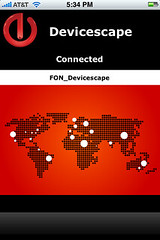
Devicescape User InterfaceAfter a few days of work, I now have a pre-alpha version of Devicescape‘s hotspot login agent running on our iPhone. It is not ready for release, but it is doing basic logins, and has a simple UI (though mostly a status screen at the moment).

The screenshot shows a connection to a FON AP, but I have also logged in to our in-house test hotspot, the T-Mobile one in Starbucks across the road and a German T-Mobile hotspot we have in our shielded room for testing against.

Still more to do on this (at the very least a button for logging out of the network would be useful), but it is a start.

None of this would have been possible without the progress made by the folks at the Phone Dev Wiki of course, especially on the toolchain.

Thanks also to Eric Sadun for the screenshot utility.