Check out the third network in this list of AT&T Wi-Fi hotspots in San Francisco, California. Never realised that Waikiki was so close. I wonder why it take United 6 hours to fly there…


Check out the third network in this list of AT&T Wi-Fi hotspots in San Francisco, California. Never realised that Waikiki was so close. I wonder why it take United 6 hours to fly there…
 I spent Thursday roaming around downtown San Francisco going from one wireless hotspot to the next testing some new features that we’re adding to Devicescape‘s hotspot login service.
I got off the ferry from Alameda just after 8:40am at the ferry building and walked up Market Street (in the rain). First stop was a Starbucks to get my email and do a quick test of a new, faster way to connect to T-Mobile hotspots.
My Logitech bluetooth headset broke; not the electronics though, the ear hook was what broke. So, I’ve been on the lookout for a replacement headset that was not too expensive, but had good reviews. This last weekend, BestBuy had a special offer (online only) for the Jabra BT125 headset, Jabra’s entry level offering, so I picked one up for just $27 after tax.
So far, I am impressed with it too. It is smaller than the Logitech, but I think it is clearer and a little more comfortable to wear. It does seem to pick up more wind noise than the Logitech though, so perhaps not the ideal choice if you are outdoors a lot of the time.

Having been a big supporter of the Gizmo Project for the last couple of years, I was disappointed with their change of policy on call-out credit expiration, and even more so with their attitude towards the outcry on their forums. The change was that any new call-out credits bought now will be expired in six months. Other providers, including Skype, expire credits too, but they do it only on inactive accounts (normally defined by no use of the feature in the last six months). Gizmo Project’s bean counters have decided that tracking user activity is too much for them to handle, and instead have gone with a simple 6 months from purchase.
When I started using Gizmo Project, using $10 in six months would not have been too difficult. Now though, after I have encouraged most of the people I call most often to join, combined with their All Calls Free promotion, I haven’t even been using that much in a year. I need a few credits there for the occasional call to a PSTN number somewhere in the world, but not that much anymore.
So, I started looking for another VoIP provider that could connect my calls to PSTN numbers around the world, and wouldn’t expire credits based on a simple fixed calendar. As luck would have it, one of our early users at Devicescape recommended a VoIP provider called VoiceStick. They have a number of fixed rate plans for US and international calling, as well as one called NextToNothing, that just charges per minute of call out time. More interestingly, they provide a local call in number for free as well, allowing people to call me on a regular phone number and get my VoIP line. But most interesting to me is another service, i2Bridge, that allows me to call my VoIP number from my cell phone (or any other phone I nominate) and then lets me dial any other number and connects me using my VoIP minutes (something I’ve often wished I could do with my Gizmo account).
Over the next few months I’ll be transitioning to VoiceStick for my VoIP service. I’ll keep the Gizmo account running on my ATA, but only for Gizmo-Gizmo calls. And I’ll be getting as many as possible of those contacts I got using Gizmo to switch to VoiceStick too so we can take advantage of the free in network calling.
 I’m way behind on uploading photos to Flickr, and also behind on any number of things that need to be done in the new house (getting some curtains up is my main project at the moment).
Somehow though the weekends seem to fly by, and before it seems possible, it is Sunday evening again and I don’t seem to have made much progress on anything. Where does the time go?
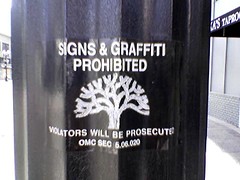
Today we went out for lunch (Luka’s Taproom & Lounge), and then spent some time shopping with friends. This sign was just outside of Luka’s, on the lamp-posts. It just amused me to see a sign prohibiting signs.
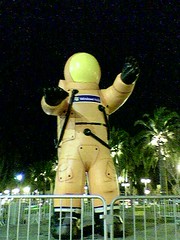 This inflatable astronaut was standing in Justin Herman Plaza tonight where they seem to be setting up a free promotional concert for Windows Vista. The concert features Jefferson Starship and will be at noon tomorrow (February 7, 2007).
Been a busy January! Lots to do getting the house set up (and still a lot more to do), then three days in Las Vegas for CES 2007 followed by a week in Puerto Vallarta with friends for a much needed break!
There have a been a lot of updates to Devicescape’s hotspot login service too in the last month (and there are more things on the way). This week we are at DEMO’07 showing off the hotspot login service. We have almost 40 networks in the list (10 confirmed working, the rest still in an experimental state) and are adding them as fast as our community members send them in.
I’m a long way behind on photo uploads; I still need to rebuild my office following the move which has not helped – hopefully I’ll get that done this week. I need to sort out which photos to get prints of for the house too, and find a way to display my magnetic photo collection (my old apartment door was metal so I had the inside of it covered in magnetic 4×6 photos).
 Sunrise on January 2nd, from the balcony of our new house. A few moments before this it was perhaps nicer (I had to run to find the camera and missed that part), but this is the moment when the whole sky seemed to be burning.
Don’t have any photos available yet (still need to unpack the PowerBook and get the photos out of the camera), but I’ve moved in to the new house. Was a busy new year’s weekend with all the moving (thanks those who helped us move all the stuff from my apartment), and it is still busy getting everything unpacked and dealing with getting appliances delivered, utilities accounts setup or transferred etc.
Added to that, Devicescape is busy with lots of updates to the hotspot login service we launched at the end of last year (if you use Wi-Fi hotspots anywhere, check it out, and if your favourite ones aren’t listed, tell us about them and we’ll get them added).
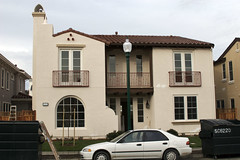 Landscaping out front is done. We have plants, grass and our tree, although the latter looks a little sorry for itself at the moment. Still seems to be lots to be done though before it is ready for us.
It is also getting harder to get photos now without things blocking the view. Lots of activity in the street, both from the builders on our side, and folks moving in and getting work done opposite.