iPhone Application Development

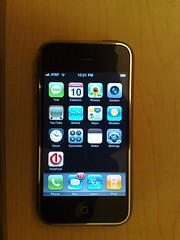
New iPhone ApplicationMaking some progress on getting applications installed on the iPhone. There is still a lot of work to do though, and the team over at the iPhone Dev Wiki (you can find them through their IRC channel: #iphone @ irc.osx86.hu, or using Google, but they ask people not to link directly) are making a lot of valuable discoveries towards this goal.

The photo, which is real, shows a new icon on the SpringBoard screen; the icon is Devicescape‘s and provides a clue as to what I am trying to add to the iPhone. Currently it just launches the FieldTest app though.

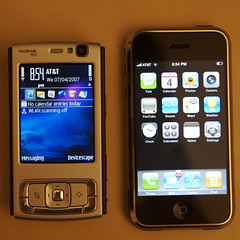
Nokia N95 vs Apple iPhone

iPhone & Nokia N95I’ve had the iPhone for a few days now (and the N95 for over a month), so I thought I’d post a little comparison. There are plenty of other places out there with reviews and comparisons, and the N95 is the obvious phone to compare it to.

The first surprise with the iPhone though is how heavy it is. The N95 feels like a hollow shell by comparison!

Purely from the specs, the N95 has the iPhone beaten. That topic has been beaten to death everywhere, including a series of amusing YouTube videos in the Apple Mac vs PC style.

The UI though leaves the Nokia in the dust (and I’m not even going to talk about Windows Mobile – that should just be purged from the earth). Most of the apps make good use of the UI too, especially the flick scrolling.

Both devices are amazing, but both have their flaws too. The N95 interface is clunky at times, though even the stunning UI on the iPhone has problems – the keyboard is really hard to use. The camera on the iPhone is terrible, though the N95 one has issues at times too (I’ve had days, like today, when the auto-focus just refuses to lock).

The biggest thing that is missing from the iPhone though is simple: no third party applications. It comes with essentially 13 applications on top of the basic mobile phone behaviour. My N95 comes with over 20 applications, and I can add more very easily. I currently have Opera Mini, Google Maps, ScreenShot and, of course, Devicescape.

Getting Connected On Campus

This is one of three Devicescape commercials that are now available on YouTube (I’ll be posting the other two later this week as well). Have you tried it yet? If not, download it for free and check it out. You can get it for Windows XP, Windows Vista, Mac OS X, Windows Mobile, the Nokia 770 and 800 web tablets and the Linksys WIP300 VoWLAN handset.

T-Mobile SDA, Devicescape, FON and Skype

One of three (silent) iSight movies I made of Devicescape-enabled devices connecting automatically to my FON hotspot here at home. To prove that it is connected, I then use the Skype application that I installed on the phone to make a call to their testing service.

This combination of cell phone, wi-fi, Devicescape and a VoIP service like Skype makes for a very compelling solution. I used tihs as my cell phone on our recent trip to Mexico since it allowed me to be on the cellular network in case somebody needed me, but use the free hotel wi-fi network to call home at Skype-out rates.

If you want to check the other two videos I made, one is the Linksys WIP300 connecting and receiving a call, the other is the Nokia 770 web tablet (I don’t have an 800 unfortunately) connecting and then going to a web page.

Can you do better? Make a video of your device connecting using Devicescape and send me the link to it through the comments here (or the Devicescape forums). I’d love to see more 🙂

Devicescape @ Demo 2007

For those that haven’t already seen it, the 6 minute presentation that Devicescape gave at this year’s Demo conference in Palm Desert is up on YouTube. I’ve embedded it here for your viewing pleasure too.

You can learn a little about Devicescape‘s hotspot login solution, and see some of the website too, but since it is free, why not just go there, download the software and try it?

Roaming San Francisco

Crepe House (Post)I spent Thursday roaming around downtown San Francisco going from one wireless hotspot to the next testing some new features that we’re adding to Devicescape‘s hotspot login service.

I got off the ferry from Alameda just after 8:40am at the ferry building and walked up Market Street (in the rain). First stop was a Starbucks to get my email and do a quick test of a new, faster way to connect to T-Mobile hotspots.

Continue reading

Back Again

Been a busy January! Lots to do getting the house set up (and still a lot more to do), then three days in Las Vegas for CES 2007 followed by a week in Puerto Vallarta with friends for a much needed break!

There have a been a lot of updates to Devicescape’s hotspot login service too in the last month (and there are more things on the way). This week we are at DEMO’07 showing off the hotspot login service. We have almost 40 networks in the list (10 confirmed working, the rest still in an experimental state) and are adding them as fast as our community members send them in.

I’m a long way behind on photo uploads; I still need to rebuild my office following the move which has not helped – hopefully I’ll get that done this week. I need to sort out which photos to get prints of for the house too, and find a way to display my magnetic photo collection (my old apartment door was metal so I had the inside of it covered in magnetic 4×6 photos).

Moved In!

Don’t have any photos available yet (still need to unpack the PowerBook and get the photos out of the camera), but I’ve moved in to the new house. Was a busy new year’s weekend with all the moving (thanks those who helped us move all the stuff from my apartment), and it is still busy getting everything unpacked and dealing with getting appliances delivered, utilities accounts setup or transferred etc.

Added to that, Devicescape is busy with lots of updates to the hotspot login service we launched at the end of last year (if you use Wi-Fi hotspots anywhere, check it out, and if your favourite ones aren’t listed, tell us about them and we’ll get them added).

Join The Devicescape Beta

So here is what I’ve been working on for past few months… a service that helps you login at wireless hotspots. What is the big deal there you ask? Well, from your laptop it is only a small inconvenience to jump through a hotspot’s sign-on page, but on a phone like the Linksys WIP300 it is impossible normally since the phone doesn’t include a web browser.

With Devicescape’s firmware in the phone, you can walk into a hotspot (currently a US T-Mobile location, any FON hotspot worldwide or Google’s Mountain View municipal network, with more to follow soon), switch on and start making calls using your Gizmo or other SIP account.

Want to try it? Sign up at http://www.devicescape.com/, download the software for your device (currently supported: Windows XP, Windows Mobile 5, the Linksys WIP300 and the Nokia 770 web tablet), enter your account info and roam around town. Remember, it’s a beta so if you encounter problems be sure to let us know and we’ll try to fix it.