Nokia has its N95, Apple has its iPhone, and Microsoft has…
… a big ass table 🙂
Thanks to the folks at Sarcastic Gamer for this one.

Nokia has its N95, Apple has its iPhone, and Microsoft has…
… a big ass table 🙂
Thanks to the folks at Sarcastic Gamer for this one.
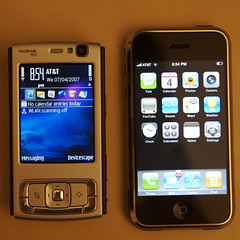 I’ve had the iPhone for a few days now (and the N95 for over a month), so I thought I’d post a little comparison. There are plenty of other places out there with reviews and comparisons, and the N95 is the obvious phone to compare it to.
The first surprise with the iPhone though is how heavy it is. The N95 feels like a hollow shell by comparison!
Purely from the specs, the N95 has the iPhone beaten. That topic has been beaten to death everywhere, including a series of amusing YouTube videos in the Apple Mac vs PC style.
The UI though leaves the Nokia in the dust (and I’m not even going to talk about Windows Mobile – that should just be purged from the earth). Most of the apps make good use of the UI too, especially the flick scrolling.
Both devices are amazing, but both have their flaws too. The N95 interface is clunky at times, though even the stunning UI on the iPhone has problems – the keyboard is really hard to use. The camera on the iPhone is terrible, though the N95 one has issues at times too (I’ve had days, like today, when the auto-focus just refuses to lock).
The biggest thing that is missing from the iPhone though is simple: no third party applications. It comes with essentially 13 applications on top of the basic mobile phone behaviour. My N95 comes with over 20 applications, and I can add more very easily. I currently have Opera Mini, Google Maps, ScreenShot and, of course, Devicescape.
One of the most annoying things about the early versions of Vista that I was playing with was the continual darkening of the screen and question about whether to allow something I had just asked for. That is what this commercial from Apple is playing off of. Perhaps the worst example of this was having to allow notepad to open each time I wanted to view the source for a web page from IE7. Apart from the fact that by now they should be able to open it inside the browser and display it with syntax highlighting like every other browser, having to approve it every time is really annoying.
 Take a look at the photo and see if you can tell what type of computer is being used there to create a cool photo book at Yophoto. It is clearly a Mac, although they have airbrushed out the Apple logo. Why would anybody do that?
Simple, the online user guide for the software that you must download and install before you can create one of these photo books says this:
Please note that unfortunately the software will not work on an Apple Macintosh.
So, the Mac was cool enough to use in their home page photo, but not actually cool enough for them to support with their software. And what is with the software anyway? Why is this not a web service that I upload my photos to, or something built on top of another photo site like Qoop? Shame because the books look like they’d have made nice gifts.
 The Unofficial Apple Weblog reports that Nirlog.com has a step-by-step guide to booting Windows XP on Apple’s latest MacBook Pro laptop. Earlier in the week they also reported that Windows XP was booting on the new iMac machines too. Problem with this in my mind, is why would you bother?
Dual booting is annoying. I live on machines that I never shut down (my laptops sleep, but rarely shutdown). I have lots of windows, mostly command line shells, open that I wouldn’t want to close just to switch to another operating system, and then have to switch back. If you want to do this, get something like VMware that lets you run multiple operating systems at the same time. So, here’s a real challenge to the folks working on XP: get VMware, or something similar, running on a MacBook Pro with Windoze running inside it. That would be something that might be useful to those stuck with running a Windoze app.
Running Windoze in place of the far superior Mac OS X seems odd too. Why open your machine up to all the problems that Windoze brings? I would have thought it would have been a more interesting hack to see if they could get Mac OS X running on another Intel based computer. There are a number of non-Apple Core Duo laptops out there now, like the 12″ Thinkpad X60; how about getting one of those to boot Mac OS X? That would be a worthwhile upgrade.
 I have been using the Gizmo Project client on my Mac for several weeks now and mostly I am impressed. I did get a Plantronics DSP500 USB headset which is both comfortable and clear. That made a big difference compared to using just headphones and the built-in microphone (using both built-in microphone and speakers is a bad idea – too much echo for the person on the other end of the line who gets to hear everything they say repeated back on the line).
Mostly, I have been making trans-atlantic calls with it and have found it to be very stable for a beta release. There have been a couple of updates (including one that restored the ability to record calls on the Mac). The only real problem I have had is with their ecommerce backend. It has been down a couple of times now so the client believes that you have no credit and won’t let you make call-out calls (i.e. calls to the PSTN). It also won’t let me buy $20 of credit at the moment. Couple that with the fact that during the beta you can only buy one block of time each week, and it could be annoying, but in fact the $10 lasted over two weeks.
I am also working with VoIP at work at the moment – porting the open source VoIP PBX software Asterisk to run on one of our wireless access points. You can read all about this work on the Devicescape blog, including a mini-review of a Wi-Fi VoIP handset from ZyXEL.
 A whole slew of new features and bug fixes in today’s update to Mac OS 10.4. On the wireless front there were a number of things:
There were also fixes to Mail, iChat and Finder as well as a whole slew of bug fixes across the system. See Apple’s release notes web page for full details.
A word of warning though: The Unofficial Apple Weblog reports that some people are having trouble connecting to AIM with iChat following the update. Oddly, the update did include a number of AIM-specific features, so perhaps there is something to this. If you use AIM from iChat, you might want to wait a while and see whether there is a problem or not.
 The Unofficial Apple Weblog has a roundup of iTunes podcasting reactions this morning.
They also have some information about the iPod update that went with iTunes 4.9 (not that I noticed this – I need to run software update I guess). The two new podcasting features that they mention are chapters in AAC files and inclusion of the podcast description on the iPod. It will be interesting to see if the chapters idea catches on. As far as I can tell, it would require me to transcode my podcasts into AAC and then listen to them to add chapter markers. I don’t normally listen to these things more than once, so unless the people producing it do this I won’t have much use for chapters!
For a few weeks now I’ve been exploring the world of podcasts. My initial reaction to this technology was simple: why would anybody listen to these things? I have found some though that are worth listening to.
Today, Apple added support for podcasts to iTunes. While this is probably a negative step for the iPodder and iPodderX projects, having support in one of the main audio software packages can only make podcast listening more widespread. By the way, those two packages do have additional features over the iTunes podcast support, and are worth checking out if you become really addicted to these things.
So, what are the podcasts that I’ve been listening too? Well, This Week in Tech and the Engadget podcast are the two that I’ve listened to more than one episode of. I am exploring some more from the iTunes podcast directory now (first up are Linux News Log, Inside Mac Radio and the Linux Links Tech Show)
 Having given up waiting for the camera connector to appear in an Apple store, I just bit the bullet and ordered it online. Since it was free shipping I’m not really sure why I didn’t do it earlier, but there you go.
Tonight I actually got around to trying it out. I was going to upload some photos I took while on my recent business trip to Seoul and Tokyo that have been sitting on my S100 since I got back last weekend. Then it struck me that I could test the iPod Camera Connector and also how easy it would be to get the photos from the iPod into iPhoto. I was also wondering whether it would cope with the S100 since it is old enough that it has a proprietary protocol. Of course, iPhoto handles it so I thought that there was a pretty good chance it would work, and sure enough it did.
Connecting the little adapter to the iPod caused it to immediately switch to the import screen. Connect the camera, turn it on and the iPod’s display tells me how many photos are available for import. Starting the import resulted in thumbnails of each image appearing on the screen as it sucked them off the camera. That simple.
Next step was connecting the iPod to the PowerBook. As always, iTunes jumped into action and did its thing, but it did not do anything about the new photos. Starting iPhoto took me directly to the import screen, with an iPod icon and the number of shots available for import displayed. Click the import button, and the photos were transferred, quickly.
Of course, I really bought it to take the photos off my 20D while travelling on vacations when I don’t have a laptop with me, so the next test will be from the 20D. First impressions though are that this little gem does exactly what it said it would, and will be the perfect solution to storing my photos while on vacations without the PowerBook. It would have been nice if it was bundled with the iPod Photo in the first place, but at $30 it remains affordable for anybody who is likely to need this capability (isn’t that most iPod Photo users?).