No Service

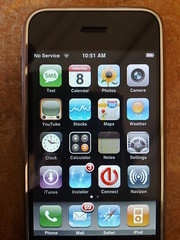
No ServiceArrived at Sugar Bowl this morning to discover that my iPhone has no service here. Oddly though, my N95, which is also on AT&T, does have coverage, and in fact pretty much full signal strength.

Luckily, here in Judah Lodge there is free Wi-Fi (SSID: EXWIRE or exwire depending on where you are). That too is a little strange as the same network is available in the main lodge, but there it is a paid hotspot network instead (which I have now added to Devicescape’s collection as well).

Also, if you’re going to provide Wi-Fi, especially paid Wi-Fi with a 2 hour minimum and day pass option, you really need to make sure that there are plenty of power outlets available as well.

Nokia Maps & the 3D View

3D ViewEarlier this week I was playing with the maps function built into my Nokia N95, which it seems is a version of Smart2Go. Aside from the slow start on the GPS (even with A-GPS it is not always that quick to get a location), the mapping works well and I’ve used it a lot.

My reason for looking at it in more detail was wanting to know whether the paid option has the one feature that is annoyingly missing from the free version: automatic recalculation of the route if you miss a turn. I didn’t get an answer to that, but for less than $15 I can enable the feature for 30 days and see how well it works on a test drive I guess.

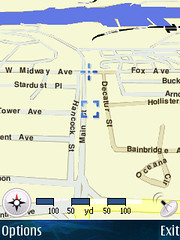
The other thing I discovered is that the maps have a 3D view option (hit ‘0’ to toggle). I’d never noticed that option in the menu before. Switching to it revealed something odd though – the cross hairs that mark the GPS position adjusted to the new perspective. The box that normally keeps track of the GPS location until you move it manually away, did not take the new perspective into account. Take a look at the 2D version here!

The big thing with the 3D view, which is also a problem with the 2D view on the phone, is that it doesn’t rotate based on the direction you’re traveling. That gets very confusing when you’re heading south!

Microsoft Leap Issues

In case anybody was in any doubt about the suitability of Microsoft products as servers, of any kind, The Register is reporting this week that something as simple as handling the extra day in February this year passed them by. Most amusing perhaps is that the technology preview, released just two days before the leap day, was affected.

Nonetheless, the SQL Server 2008 “community technology preview” was brought down by the dreaded Leap Year Day bug just 48 hours after Microsoft unveiled it. “We have recently discovered an issue with SQL Server 2008 CTPs that result in SQL Server 2008 not starting on Feb 29 GMT only,” read a statement from the company. “We recommend that you do not run or install this CTP on Feb 29 GMT to minimize any impact in your environment. You can install starting on March 1 GMT.”

The advice given by Microsoft? Don’t install it or run it on that day. Great solution guys. Would that answer be the same for production software? No reason to think otherwise since they left UK users with the wrong time on all their machines for a week not that long ago when they got the daylight savings rules wrong. So, that web site you run with SQL Server as a backend – just turn it off for a day to “minimize the impact” of their poor quality software. I’ve got a better idea: spend that day upgrading to a real platform (try Linux or FreeBSD).

But it gets better:

And there was a very similar problem with Windows Small Business Server. On Leap Year Day, Windows SBS was unable to issue itself certificates because it stamped each certificate with the date February 29, 2013. So, it failed to recognize the correct date. And it replaced the correct date with a date that doesn’t exist.

Not only did it fail to understand the leap day in the date, it then compounds the problem by producing certificates with a non-existent date on them instead of just saying the date is invalid! But since it is only a small business product, no problem just leaving it that way. They won’t sue Microsoft after all – they don’t have the cash to do that.

Backslash?

Backslash?Why is it that people just cannot get URLs right. The backslash in there between nchs and nhanes.htm is wrong. It shouldn’t be in the URL, and even more bizarre in this case: they only got one wrong. Didn’t anybody think that was odd?

It works, presumably because the CDC is also stupid enough to have fallen for the ‘Windoze can be a server’ lie. Windoze just about passes as an office automation suite. It is not an OS, and it certainly isn’t a server OS. Anybody who installs it as a server OS, or recommends it as a server OS, should be fired.

108″ LCD

108" LCDOur 52″ Sharp Aquos LCD does look a little small at times, so I guess this would have been a better choice, at least if there was no limit on the budget (as it was, the 52″ was only possible because it was last year’s model on deep discount).

If 108 inches is not enough for you, then take a look at Panasonic’s 150″ plasma – the world’s largest TV so they claim.

Personally, I think the 52″ screen is fine; the 65″ would have been nice too, but wasn’t worth the difference. More interesting to me was the number of screens on show that were only an inch or so thick (or perhaps that should be thin). At that size, I can see them becoming art installations, connected to a server in the house, or even out on the net, to provide a near infinite source of art choices.

Two companies, Sony and Samsung, were showing off ultra-HD sets too (basically four 1080p screens in one). Not sure what value this has today for video, but if it can be made inch-thin then it will certainly be better for showing that art work off. Talking of Samsung, not sure what they missed about the concept of a trade show, but they had ‘no photography’ signs all over their booth!

Devicescape Updates

I have a couple of Devicescape updates for everybody tonight (and I’ll also post some more photos soon, but you can check most of those out in my Flickr stream anyway.

Nokia Videos
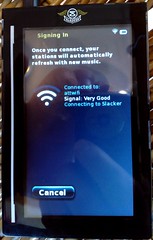
The video to the right is a video shot by our friends at Nokia that shows Devicescape logging in automatically at a T-Mobile hotspot. Here’s another one shot at San Jose airport.

Both of these videos used the T-Mobile network, but Devicescape also works on most of the other hotspot networks you’ll find around the world.

SF New “Mobile” Tech
The other thing I wanted to mention was that I presented at SF New “Mobile” Tech last night here in San Francisco. If you were there, thanks for coming (especially all the folks who already had Devicescape running on their devices).

iPhone Update

Devicescape for your Apple iPhone
First thing, Devicescape announced today that the iPhone version of its hotspot login software will be available very soon. Check out the Devicescape blog post for information about getting on the list for downloads if you’re interested in trying that out.

iPhoneOpener
Since there are now much simpler ways to get the iPhone ready for third party software, I suggest that people don’t use my iPhoneOpener software anymore for this purpose. Instead, I recommend iNdependence for Mac users looking to get ssh/sftp setup, and the Nullriver Installer.app for those on Windows or Mac OS looking to just add cool third party apps to their iPhones.

FON Blocking Some YouTube Content

Much the same way as FON were accidentally blocking access to half of the Flickr image pool because of badly setup DNS, it seems that they are now blocking access to some Google hosted content. That affects some YouTube videos, some of which seem to be hosted on Google servers already, as well as some other Google acquisitions like Orkut.

The screen grab shows what you see when you try to go to one of these videos while connected through the FON AP (and I’m connected to the private network SSID on it here, not the public hotspot SSID). Connecting directly to my local ISP, the video plays without any problem.

Continue reading

Windows Genuine Disadvantage

Boing Boing is reporting that the servers at MS that provide the backend for the Windows Genuine Advantage malware that they insist on forcing people to install as a critical update to Windows systems, are down. The result is that any XP or Vista machines asking MS if they are genuine will assume that they’re not.

On Vista, perhaps the most appropriately named version of Windows ever (looks pretty, adds nothing new), there are reports that this will cause it to revert to a more basic mode, disabling many of the important features (like the transparency & visual effects on the desktop – see what I mean about the name).

Initial reports said that the servers might be down until Tuesday, though there is now a posting on an MS forum stating that they are working on getting them back ASAP, and that machines should not be going into a reduced functionality state.

What are the lessons to be learned here? For consumers:

  • Don’t buy from a company that treats you as a thief from the outset. There are plenty of viable alternatives out there now that will not be subject to this kind of failure. Use FreeBSD, Linux or even Mac OS. This is another area where Apple leads the way in the commercial space I think: rather than trying to force malware on its users (by calling it an Advantage), they chose to create a family pack license that allows people to upgrade multiple machines in one household for a much reduced price. A smart approach.
  • Don’t believe it when a company tells you that they’re adding DRM to protect you. This WGA malware is not there to protect you; it is there to monitor you and report back to MS.

For Microsoft there might be some lessons here too:

  • Don’t run critical systems on Windows. It is not a good enough OS to run critical servers. It is almost good enough to run word processing software, though even that is doubtful.
  • Don’t use DRM to protect software like this. The only people not impacted by this server failing are those running the illegal copies where the feature has been disabled already. Once again, DRM hurts the honest paying customers, and has no impact on the problem.